The right message,
at exactly the right moment.
Set up message templates once and let them run for every reservation. Scheduled relative to check-in, check-out or booking, sent on the guest's own channel, and gated by conditional rules so only the right guests ever receive them.
The stay timeline
Every message, placed on the journey.
Templates are scheduled relative to the reservation. Press play to watch a stay unfold, or pick any message to see when it fires, on which channel, and the rules that gate it.
- When
- 3 days before Check-in date
- Channel
- Who
- Both app users & invites
- Rules
- IFCheck-in status equals Not checked inAll rules must pass (AND) or the message is skipped for that guest.
Hi Sophie 👋 Your suite is ready in 3 days. Check in online now to skip the front desk.
Variables like {guest.firstName} fill in per reservation, in the guest's language.
Channels
Same channels as your inbox. Now on a schedule.
A template belongs to a channel, and each channel holds as many templates as you need. Reach guests where they already are.
The channel guests open most. Rich, personal, and read within minutes.
On-brand HTML for the longer, richer messages like confirmations and guides.
Universal fallback that lands on any phone — no app or data required.
Nudge guests inside your branded app, right where they plan the stay.
Message templates
Write it once. It runs forever.
Each template is scheduled relative to the reservation and reused across every booking, so the whole guest journey communicates itself.
N days before or after check-in, check-out, booking, cancellation or a completed check-in.
App users, invited guests, both, or the booker only. Your call, per template.
All properties by default, or target specific room types and listings.
Hi {guest.firstName} 👋 Your stay at {property.name} starts in 3 days. Check in online now to skip the desk.
Conditional rules
Scheduled decides when. Rules decide whether.
Add filters on top of a template's schedule. Ten rule types, evaluated at send time and combined with AND. If any active rule fails, the message is quietly skipped for that guest.
Check-in or check-out inside (or outside) a set period.
Check-in between Dec 1 – Feb 28 → “Winter welcome”
Whether the guest has checked in by the time it sends.
Status equals Not checked in → “Don't forget to check in”
Whether specific dates fall within the guest's stay.
Dec 31 any in stay → “Happy New Year”
Which weekday check-in or check-out falls on, in the property's time zone.
Check-out matches Sunday → “Late check-out available”
How many guests registered or were invited to the guest portal.
Users equals 0 → “Get the guest app”
Whether a guest on the reservation is in one of your groups.
Is in Returning → “Welcome back”
Where the booking came from: an OTA or direct.
Came from none of Direct → “Book direct next time”
Whether an experience, amenity, guidebook or event is on their itinerary.
Breakfast not purchased → “Add breakfast”
How many nights the reservation covers.
Nights at least 7 → “Weekly rate offer”
How positive the guests' recent messages are, scored 0–100%.
Sentiment at least 40% → “Leave us a review”
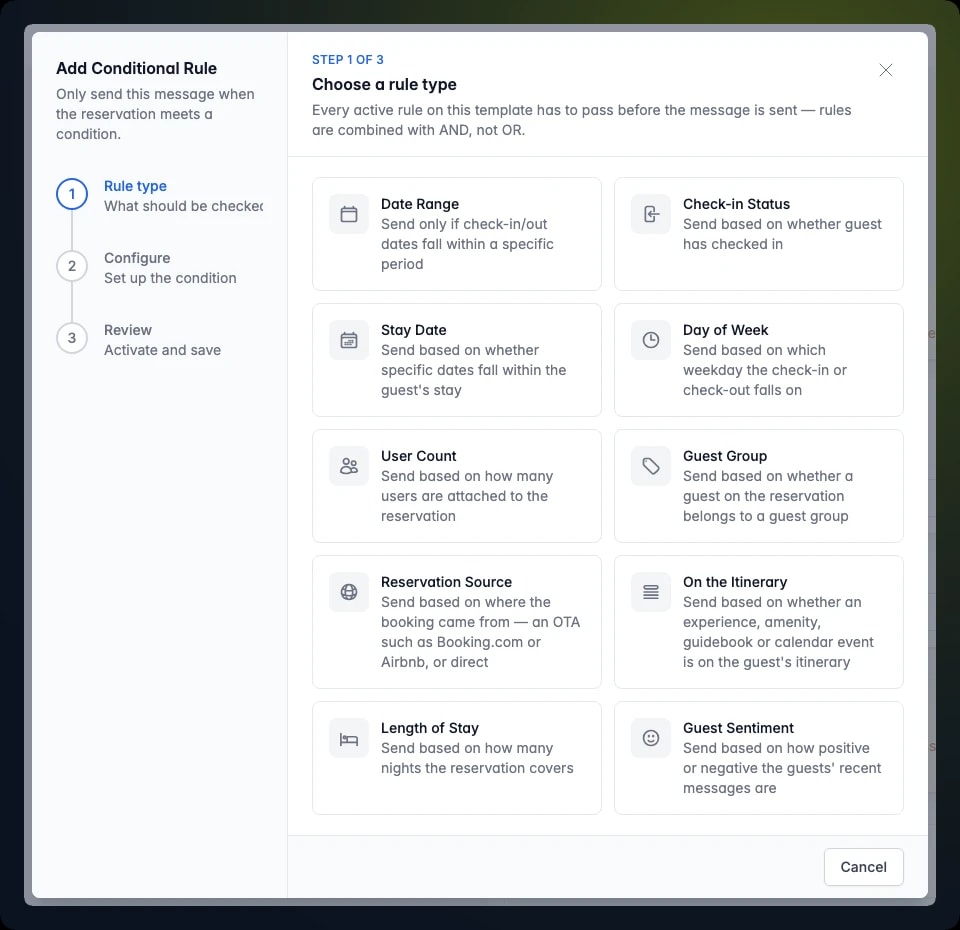
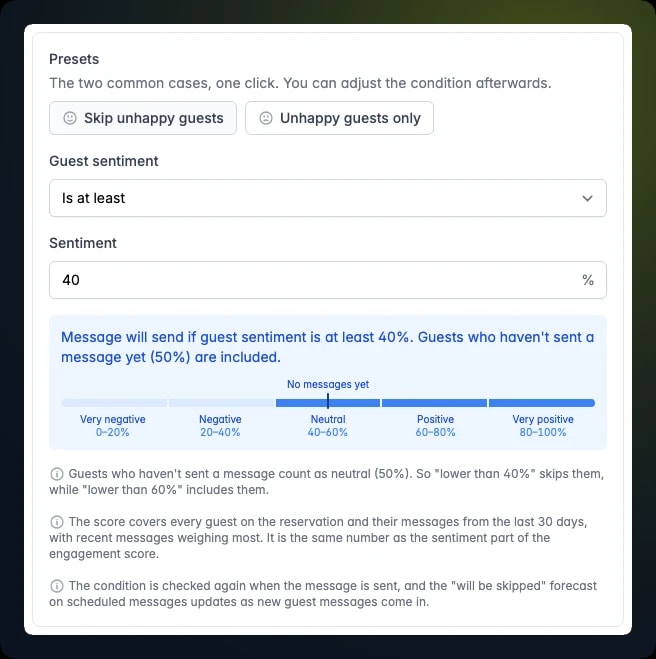
Each reservation shows which scheduled messages will be skipped, and the forecast updates as dates, check-ins or sentiment change.
When every date range on a template has ended, the template is archived automatically.
Split it into separate templates. Rules on one template always combine with AND.
Set the journey up once. Let it run itself.
Every guest gets the right message at the right moment, on the right channel — without your team touching a thing.