Self check-in for hostels, parks and aparthotels
Hostels, holiday parks and aparthotels do not have a queue problem. They have a nobody-is-there problem. Four steps on the guest's own phone, a camera reading a passport, a signature on glass, and the reservation staying correct in the PMS you already run.

A hostel with one person on nights, who is also running the bar.
A holiday park where reception closes at 18:00 and sixty units change over on a Saturday.
An aparthotel with no desk at all. A lobby, a lift, and a cleaner who left at two.
None of these properties has a queue problem. They have a nobody-is-there problem, and it is a different thing. Most check-in software is written for a hotel that wants its front desk to move faster. These three segments do not want a faster desk. They want arrival to work on the nights when there is no desk.
So the question is not how to shorten check-in. It is how to automate guest check-in without a front desk and still know who walked in, which unit they are in, and what they agreed to.
Four steps on the guest's own phone. A camera reading a passport. A finger signing on glass. And the reservation staying correct in the system you already run the property on. This is the second entry in the Frictionless Arrival pillar.
When is the desk not the answer?
Arrivals do not spread evenly. They compress. That is the shape of the problem in all three segments, and it is why more staff is the expensive answer and longer opening hours the wrong one.
Hostels: the arrival wave
A hostel takes most of its arrivals inside a two-hour window in the late afternoon, from people who have been travelling since dawn and who arrive on foot, in ones and twos. Dorm beds mean bed-level assignment, not room-level. Group bookings mean six names, of which you were given one.
A self check-in system for hostels has to survive that wave without a second person behind the counter. Every arriving guest has already given their details, scanned their document and signed before they reach the door, so the person on shift greets people instead of typing names off a passport.
The bed assignment, the guest details and the signature all end up on the reservation in the hostel's existing PMS, not in a separate list somebody reconciles afterwards.
Holiday parks: online check-in software for a Saturday changeover
A park's changeover is one day, one window, and a car for every unit. Guests arrive at the barrier having driven four hours with children in the back, and reception is a hut two hundred metres from the pitch they are looking for. The queue does not form at a counter; it forms on the access road.
Online check-in software for holiday parks has to move the paperwork off Saturday entirely. Details in, document scanned, park rules signed, arrival window confirmed, all of it done on Thursday at a kitchen table. What is left on the day is directions and a welcome.
The park's PMS still owns the booking. We read the unit, the dates and the party size from it and write the finished guest record back, so the Saturday list reception works from is the list the PMS holds.
Aparthotels: online check-in software for an unstaffed evening
An aparthotel is the hardest case, because there is often no desk to fall back on. Stays are longer, guests are usually travelling for work, and flights land at 23:40. A night presence for four late arrivals a week is not a cost anyone can defend.
Online check-in software for aparthotels therefore has to be complete rather than partial. A half-finished check-in that still needs a human at the end is not automation, it is a deferred phone call. LabNul50 retired its 24/7 phone concierge on exactly this basis and has logged 25,000+ guest-opened doors since.
Longer stays make the guest record matter more, and it belongs in one place: the PMS the operator already bought, kept current by two-way sync rather than by somebody retyping it on Monday.
What does the guest actually do?
Four steps. No app, no account, no password.
One. They tap a link in a message. It arrives on the channel they already use, opens in their phone's browser and knows which reservation it belongs to. Nothing to download, nothing to remember.
Two. They confirm who is coming. Dates, unit, arrival time, the names of everyone in the party. For a hostel group booking this is the step that turns one lead name into six real guests.
Three. They scan their document with the camera. The fields fill themselves. More on what that does and does not mean below.
Four. They sign. Rental agreement, house rules, park rules, whatever the property attaches. Finger on glass, done.
Then they are checked in. What reception no longer does is that whole list: no clipboard, no photocopier, no typing a date of birth off a card while somebody waits with a rucksack on.
What does passport scanning check-in software actually read?
This is the moment worth being precise about, because the category is loose with it.
Camera ID capture reads a document and fills fields. That is the entire claim.
The guest holds a passport or an ID card up to their phone. The camera reads the machine-readable zone and the printed fields, and the form fills itself: name, date of birth, nationality, document number, expiry. The guest checks what was read, corrects anything wrong, and carries on.
It does not verify identity. It does not check whether the document is genuine. It does not detect fraud, and it does not authenticate the person holding it. Passport scanning check-in software that says otherwise is describing a different product. Ours removes the typing, not the judgement. If you need to know that the face matches the document, a human still looks at the face.
Saying so is not a weakness. It is the reason you can trust the rest of it. A tool that overstates what it reads is a tool you second-guess on every arrival.
Two honest limits. Worn documents, poor lighting and cracked screens all reduce the read, so every field stays editable and the guest can type. And browser camera behaviour varies between devices, the trade we took in return for never asking a guest to install anything.
Can a guest sign the rental agreement before they arrive?
Yes, and for a park or an aparthotel this is often the step that was holding the whole arrival hostage.
A digital signature on a rental agreement at guest check-in works the way the rest of the flow does. The document appears in the browser, the guest reads it, signs with a finger, and the signed copy is stored against the reservation with a timestamp. No printing, no scanning, no envelope in a drawer, no chasing the one guest in nine who left before signing.
Attach what the property needs signed: the rental agreement, the house rules, the damage terms, the pool or parking terms. These are set per property, not per guest.
Reception stops being a filing station. The signature exists before the taxi does, and nobody asks a tired guest to read two pages of terms standing up.
How do you get guests to finish it?
This is the real objection. Operators do not fear the technology. They fear doing the job twice: once in the flow for the guests who bother, once at the desk for the guests who did not.
Completion is a prompting problem. So we own the prompt.
Pre-arrival messaging goes out on the channel the guest already uses, on a schedule you set: an invitation when the booking confirms, a reminder a few days out, a chase the morning before arrival, a confirmation when it is finished. Each one carries the link back into the flow, in the guest's own language.
Those messages are not a separate system. Every conversation from email, guest app chat, SMS and WhatsApp lands in one filterable queue, one thread per guest per channel, so a reply to a check-in reminder is a conversation and not a dead end. When a guest answers a prompt with a question, the same AI that handles the rest of the inbox answers it, and what it cannot answer becomes a task to fill the gap rather than a guess.
Rens/Spain saw 75% fewer inquiries after the pre-arrival sequence went live. The questions were not left unanswered. They stopped being asked, because the answer arrived first.
What does reception see at 15:00 on a changeover day?
One screen, showing today.
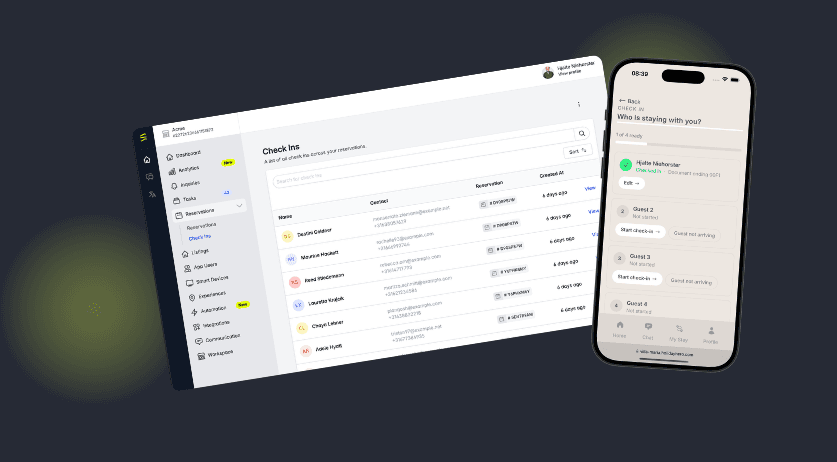
The check-ins view lists today's arrivals and the state of each one: finished, started and abandoned, or nothing yet. Document scanned or not. Signature in or not. Expected arrival time where the guest gave one.
At 15:00 on a Saturday that is the only list the person on shift needs. Six outstanding out of sixty, sorted by arrival time, each one a tap away from a reminder. The work shrinks from sixty arrivals to six exceptions, and the shift stops being a reaction to whoever walks in next.
It is also the list that tells you where to put your one spare person. Not everywhere. On the six.
Does it run on the PMS you already have?
Yes, and this is the argument that decides it for most of the operators we talk to.
HolidayHero sits on top of the PMS you already bought. We do not replace it, and we do not take over its job of holding the booking. The PMS stays the system of record for the reservation. We run the arrival.
That works because the sync goes both ways. We read the reservation out of the PMS: dates, unit, party size, arrival, rate. The guest fills in the rest. Then we write the enriched guest record back: full names, dates of birth, nationalities, document details, signed documents, completed check-in state. The PMS ends the day holding better data than it started with, entered by the guest rather than by your staff.
That is what makes online check-in that syncs with Mews different from a form that emails you a PDF. Same for the Hostaway integration and the rest of the directory. We run 20+ PMS integrations, and the arrival flow behaves the same way whichever one is underneath. Why does a PMS's own check-in module often disappoint? Not on quality. Those modules were built to satisfy a field on a reservation. Ours was built to greet a guest at 23:40 with nobody in the building. One is a data entry screen with a guest-facing URL. The other is an arrival. Not the same job.
No migration, no export, no PMS contract to renegotiate. Published pricing from €6.50 per unit per month, with no setup fee.
What comes next?
This week is the arrival itself: four steps, the camera, the signature, and the record landing back in your PMS. Next Tuesday's Radar entry takes the same flow one step further, into the paperwork that follows a completed check-in. That is next week's post, and there is nothing of it in this one.
If you want to see the four steps on a real phone, the Frictionless Arrival pillar has the full picture, or book a demo and we will run your own Saturday changeover through it.
Frequently asked questions
How do I do online check-in if my PMS does not support it?+
Can guests scan their passport with a phone camera?+
Do guests have to download an app to check in?+
Keep reading